Smartphones are packed with apps for communication, entertainment, shopping, banking, photography, and productivity. As more apps are installed, finding the right one can become frustrating. Home screens fill up quickly, app drawers get crowded, and searching for an app by typing its name takes extra time.
Lens Launcher offers a different approach. Instead of spreading apps across multiple pages, it displays all installed apps on a single screen, making them easier to access. Its unique interface is designed to help users open apps quickly while keeping navigation simple and efficient.
Also read: Gesture Lock Screen: A Unique Way to Secure Your Android Phone
What Is Lens Launcher?
Lens Launcher is an Android launcher that focuses on fast app access. Rather than using multiple home screen pages, widgets, and complex layouts, it places all app icons together on one screen.
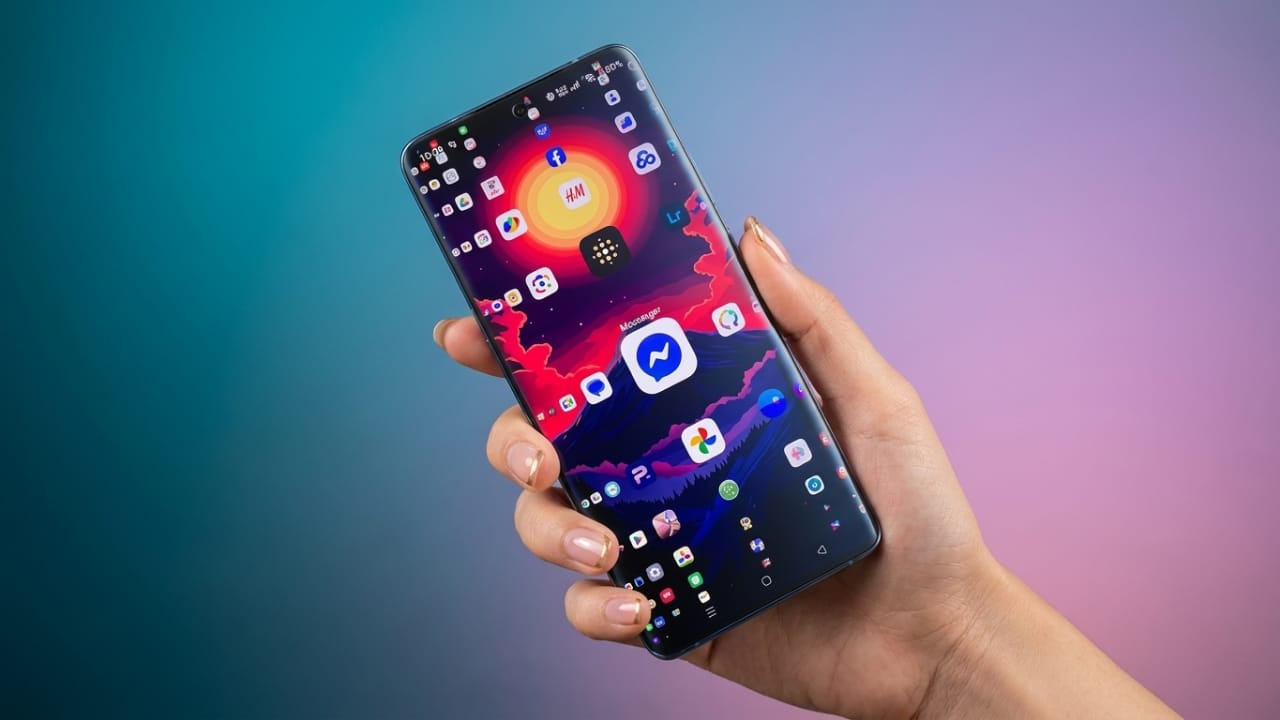
The launcher uses a special zoom effect that enlarges icons near your finger. As you move across the screen, nearby icons become larger and easier to select. This allows users to quickly locate and launch apps without excessive scrolling.
Its lightweight design and straightforward functionality have made it a popular choice among users who prefer speed and simplicity.
How Does Lens Launcher Work?
After setting Lens Launcher as your launcher, all installed apps appear in a compact grid. The icons remain visible on a single page, reducing the need to switch between screens.
Key aspects of its interface include:
- All apps displayed on one screen
- Icons enlarge automatically as your finger moves nearby
- Apps open with a simple tap
- Less scrolling compared to traditional launchers
This design is especially useful for users who want faster access to their apps without navigating through multiple menus.
Key Features of Lens Launcher
1. Smart Zoom Effect
One of the standout features is its lens-style zoom system. When you move your finger across the display, nearby icons become larger, helping you identify and select apps more easily.
2. Single-Screen App Access
Instead of organizing apps across several pages, Lens Launcher keeps everything visible in one place. This can make app navigation quicker and more convenient.
3. Personalization Options
Users can customize several visual settings, including:
- Icon size
- App spacing
- Zoom intensity
- Haptic feedback options
These settings allow the launcher to match individual preferences.
4. Full Launcher Functionality
Lens Launcher can serve as a complete home screen replacement. Users who enjoy its interface can set it as their default launcher and use it daily.
5. Lightweight Performance
The launcher is designed to remain simple and efficient. Since it avoids heavy visual effects and unnecessary background processes, it typically uses fewer system resources.
6. Gesture-Friendly Navigation
Most interactions happen through simple finger movements and taps. The zoom effect works automatically, making navigation feel smooth and intuitive.
Benefits of Using Lens Launcher
Faster App Access
With all apps available on a single screen, users can often reach their desired app more quickly.
Clean and Minimal Interface
People who prefer a clutter-free setup may appreciate its simple design and focused functionality.
Flexible Customization
Various appearance settings allow users to adjust the launcher according to their needs.
Efficient Resource Usage
Its lightweight design can help maintain smooth performance without adding unnecessary load to the device.
Comfortable One-Handed Operation
The zoom-based interface can make app selection easier, especially on phones with larger displays.
Who Might Like Lens Launcher?
Lens Launcher can be particularly useful for:
- Users with many installed apps
- People who want faster app access
- Fans of minimal user interfaces
- Content creators and professionals who frequently switch between apps
- Anyone looking for a different Android launcher experience
Everyday Usage Experience
At first, Lens Launcher may feel unfamiliar because it doesn’t follow the traditional home screen layout found on most Android devices. However, after spending some time with it, many users find the navigation system easy to understand.
The zoom effect is smooth and visually appealing, while the single-screen layout can make app browsing feel faster and more organized.

Also read: Computer Launcher for Android: Turn Your Phone Into a Desktop-Style Experience
Final Thoughts
Lens Launcher takes a unique approach to Android navigation by placing all apps on one screen and using a smart zoom effect for selection. Its lightweight performance, customizable interface, and focus on speed make it an interesting option for users who want a simpler way to access their apps.
If you’re looking for a launcher that prioritizes quick navigation and a clean design, Lens Launcher may be worth exploring. Its innovative interface offers a fresh alternative to traditional Android launchers while keeping app access fast and straightforward.

Jatin Rajput (Tech Golu) — Tech blogger & YouTuber with 6+ years of experience in WhatsApp, Instagram, Facebook, and mobile guides. Founder of TechGolu.in.