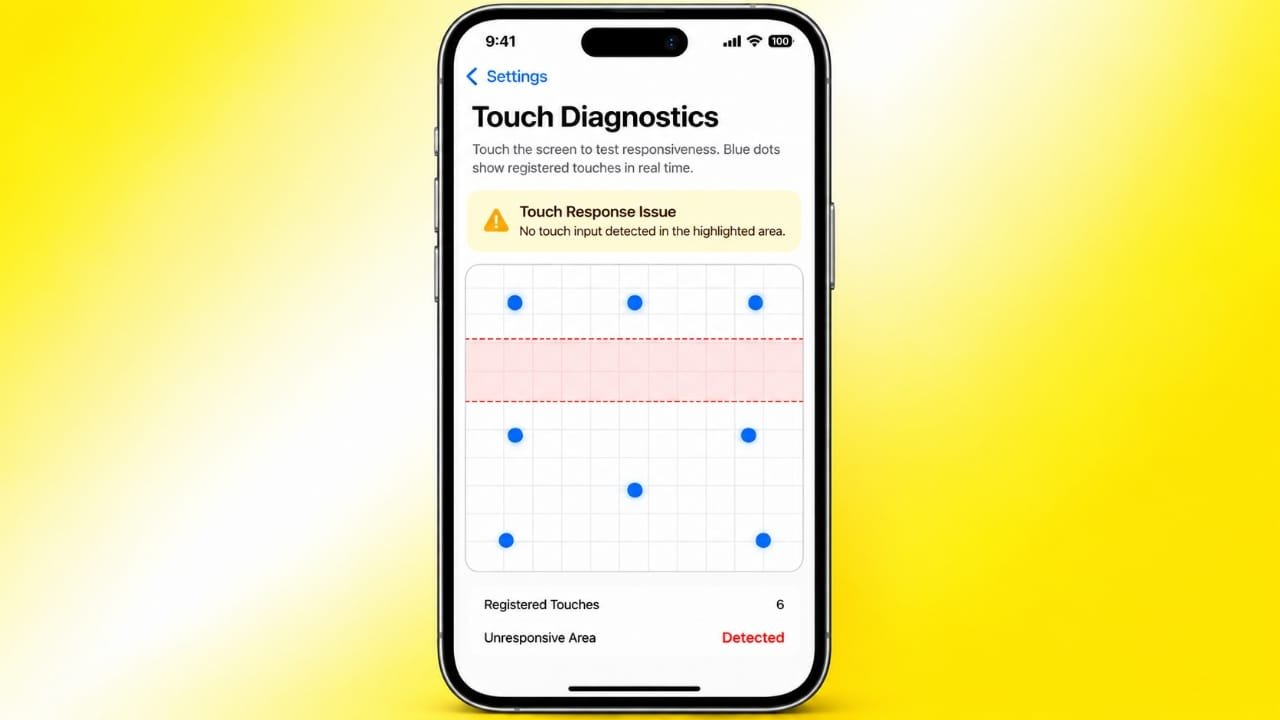
iPhone Touch Disease is a term used to describe a touchscreen-related hardware problem reported on some older iPhone models. Affected phones may start showing touch problems, making everyday tasks such as typing, scrolling, or opening apps difficult.
One of the most noticeable signs is a flickering gray area or bar near the top of the display. In some cases, the touchscreen may eventually stop responding altogether.
Also read: How to Turn Your iPhone or Android Phone Into a Mobile Hotspot
What Is iPhone Touch Disease?
Despite the name, iPhone Touch Disease is not an actual disease or software infection. It is a commonly used name for a hardware-related touchscreen issue.
The problem became particularly associated with the iPhone 6 Plus. Similar reports have also appeared involving the iPhone 6, although Apple’s official repair program was specifically associated with the iPhone 6 Plus.
Not every device develops the issue. Some affected phones may experience occasional touch problems, while others can eventually become extremely difficult to use.
Common Symptoms of iPhone Touch Disease
The symptoms can become more noticeable over time. Common signs include:
- Touches occasionally fail to register.
- Scrolling becomes unreliable.
- Pinch-to-zoom gestures stop working properly.
- Other multitouch gestures may not respond.
- A flickering gray bar may appear near the top of the display.
- The touchscreen may become increasingly unresponsive.
- Typing can become difficult because taps are not detected correctly.
- Using apps and navigating through menus can become frustrating.
A gray bar combined with worsening touchscreen responsiveness can be a useful warning sign, although these symptoms alone do not prove that the phone has Touch Disease.
Which iPhone Models Are Associated With the Problem?
The iPhone 6 Plus is the model most closely associated with Apple’s historical Touch Disease repair program.
There have also been reports of similar touchscreen problems on the regular iPhone 6. However, Apple did not officially include the iPhone 6 in the same repair program.
This distinction is important if you are looking for official service. Eligibility can depend on the device model, its condition, location, and the availability of Apple’s service program.
Because older repair programs can expire or change over time, it is best to check Apple’s current support information before making a repair decision.
What Causes iPhone Touch Disease?
The exact cause has been discussed differently by Apple and independent repair specialists.
Apple previously associated the problem with devices that had experienced repeated hard impacts. Drops can put mechanical stress on internal components and connections.
Independent repair specialists, including iFixit, examined another possible cause involving the touchscreen controller chips and their connections on the logic board.
These explanations are not necessarily mutually exclusive. Physical impacts could potentially contribute to weakened internal connections, while the phone’s hardware design may also play a role in some cases.
There is therefore no single explanation that should automatically be assumed for every affected device.
Why Is It Called a “Disease”?
The word “disease” is simply part of the popular name for the problem. It does not refer to a medical condition.
An affected iPhone cannot spread the problem to another phone. There is no virus or contagious infection involved.
The term became widely used because it describes a recurring type of touchscreen failure seen in certain older iPhones.
Can a Screen Replacement Fix It?
Not necessarily.
It is easy to assume that a touchscreen problem means the display itself needs to be replaced. However, Touch Disease is generally associated with components and connections on the phone’s logic board rather than simply the outer display glass.
Because of this, replacing the screen may not resolve the underlying problem.
If the display is physically cracked, that is a separate issue and may require a screen replacement. A technician should diagnose the phone before you spend money on a new display.
Is Replacing the iPhone the Better Option?
Replacing the phone is one possible solution, particularly when the device is very old or the repair cost is not worthwhile.
However, buying another used or refurbished device does not automatically guarantee that it will never develop hardware problems. The condition and history of the replacement phone should be considered before purchasing it.
Getting the existing device properly diagnosed can help you understand whether repair or replacement makes more sense.
How Can iPhone Touch Disease Be Repaired?
Because the suspected problem can involve the logic board, repairing it may require specialized skills.
A technician experienced in micro-soldering can inspect the relevant components and connections. Depending on the actual fault, they may be able to repair damaged or weakened connections.
This type of work requires specialized equipment and experience. It is different from simply replacing a battery or display.
The repair method also depends on the specific condition of the phone, so no single repair procedure will work for every device.
Should You Try to Repair It Yourself?
DIY repair is generally not a good idea unless you already have the necessary electronics and micro-soldering experience.
Opening an iPhone incorrectly can damage delicate components. Attempting motherboard-level soldering without the right equipment can make an existing problem worse.
For most users, having the device inspected by an experienced repair professional is a safer option.
Apple Service vs. Third-Party Repair
There are two main routes to consider: official Apple service and an experienced independent repair shop.
Apple’s historical Touch Disease program was specifically associated with the iPhone 6 Plus and had its own eligibility requirements and regional limitations. Because that program was limited in time, current service availability should be confirmed directly with Apple.
An independent repair shop may offer logic-board or micro-soldering services. However, the quality of these repairs can vary significantly between technicians.
Before handing over your phone, consider asking:
- Does the technician regularly perform micro-soldering repairs?
- What exactly will be inspected or repaired?
- Is there a repair warranty?
- What is included in the quoted price?
- Could additional damage change the final cost?
- What happens if the repair is unsuccessful?
- Will your data remain on the original device?
Getting clear answers beforehand can help avoid unexpected costs.
Back Up Your iPhone Before Repair
Before giving your phone to any repair center, back up your important data.
Save important photos, contacts, messages, documents, and other files using an appropriate backup method. You can use iCloud or a computer backup, depending on your setup.
A backup is especially important when dealing with older hardware because repair or replacement may not always go exactly as expected.
What to Do If Your iPhone Shows These Symptoms
If your older iPhone starts showing touchscreen problems, follow these basic steps:
- Back up your important data.
- Note when the touchscreen problem occurs and what symptoms you see.
- Avoid opening the phone yourself if you do not have repair experience.
- Check Apple’s current service options for your model and region.
- If considering a third-party repair, choose a technician with relevant micro-soldering experience.
- Ask for the repair cost and warranty before approving the work.
- Confirm what happens if the repair cannot be completed successfully.
Also read: How to Turn On Theft Detection Lock on Android
Final Thoughts
iPhone Touch Disease is a commonly used term for a touchscreen hardware problem associated mainly with older iPhones, particularly the iPhone 6 Plus.
Typical signs include intermittent touch failures, unreliable multitouch gestures, and a flickering gray area near the top of the display. Since the underlying issue may involve the phone’s logic board, simply replacing the screen may not solve it.
If your iPhone shows these symptoms, start by protecting your data with a backup. Then have the device properly diagnosed before spending money on repairs. For board-level problems, an experienced technician with micro-soldering skills may be able to determine whether the phone can be repaired.

Jatin Rajput (Tech Golu) — Tech blogger & YouTuber with 6+ years of experience in WhatsApp, Instagram, Facebook, and mobile guides. Founder of TechGolu.in.