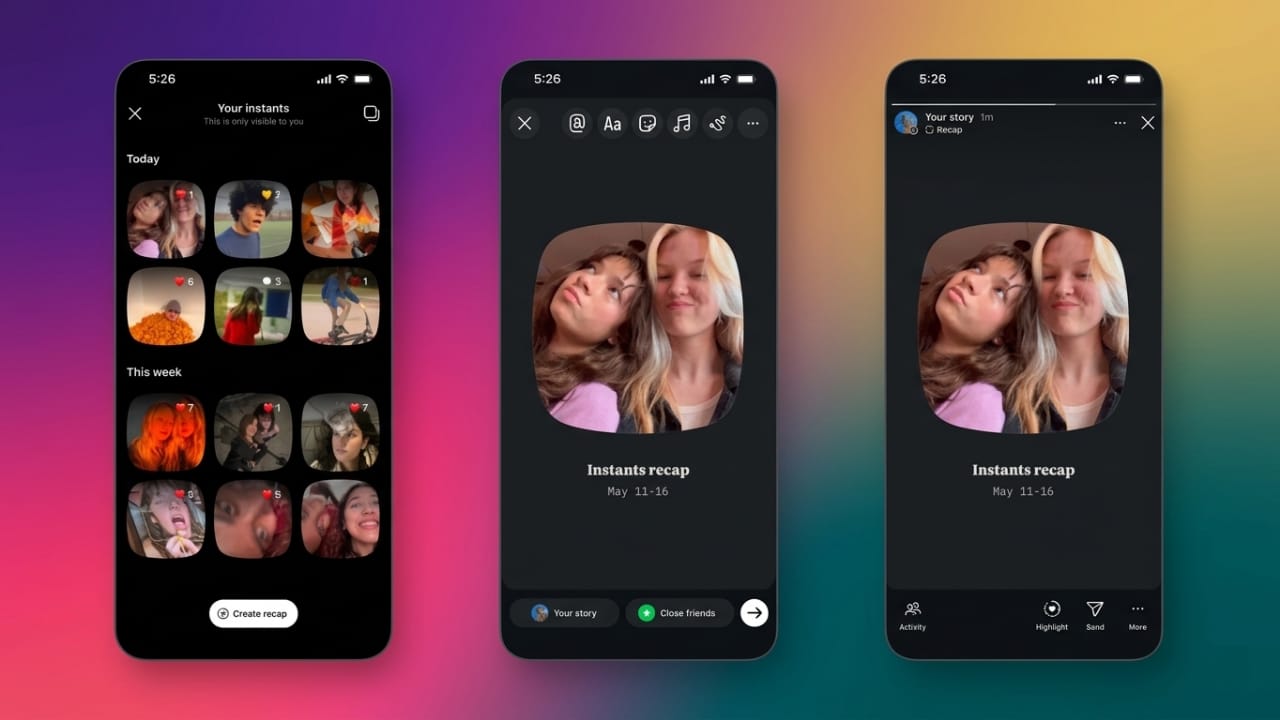
Instagram has introduced a new feature called Instants, designed for quick and private photo sharing through direct messages. The feature focuses on casual conversations and allows users to send temporary photos without the pressure of creating polished content.
This update is aimed at making photo sharing feel more natural and personal. Many users have compared it to features seen in apps like Snapchat and BeReal because of its disappearing-photo style.
Also read: How to Create a Close Friends List on Instagram for Private Sharing
What Is Instagram Instants?
Instants is a private photo-sharing option available inside Instagram messages. It lets users capture and send temporary pictures directly through the app.
Advertisements
Photos shared through Instants disappear after being viewed or after 24 hours. This creates a more casual way to communicate without leaving permanent content in chats.
The feature is available for both Android and iPhone users.
How It Works
Instants appears inside the Instagram inbox area. Users can quickly open the feature and take a photo using Instagram’s built-in camera.
At the moment, users cannot upload pictures from their phone gallery. Every photo must be captured in real time using the in-app camera.
Instagram has also kept the experience simple by removing extra editing tools. That means no filters, stickers, or advanced effects. Users can only add a short caption before sending the image.
The goal is to encourage fast and authentic sharing between friends.
Main Features of Instagram Instants
- Photos disappear after being viewed or within 24 hours
- Uses only Instagram’s built-in camera
- No filters or editing tools available
- Emoji reactions are supported
- Photos may remain available in the sender’s private archive for a limited period
Privacy and Safety Options
Meta has included privacy-focused tools to improve control over shared photos.
If a user sends a photo by mistake, they can remove it before the recipient opens it. Once deleted, the unopened image is removed from the recipient’s inbox.
Instants also includes private archiving support. Archived photos are visible only to the sender and can be used later for personal memory collections or story-style recaps.
Recipients can react with emojis after viewing a photo and continue the conversation through normal Instagram direct messages.
Extra Features Included
Some additional tools help improve flexibility and control:
- Undo option for removing unopened Instants
- Snooze setting to hide incoming Instants temporarily
- Easy restore options for later access
- Private archives only visible to the sender
- Story recap support using saved content
User Feedback and Criticism
After launch, some users shared concerns about the feature’s usability.
A common issue was confusion around default sharing settings. Some users reportedly found it unclear who would receive a photo before sending it, which raised concerns about accidental sharing.
Others felt Instagram already has many built-in features, while some users liked the simpler and more private style of communication.
As with many new updates, user feedback may shape future improvements.
How to Disable Instagram Instants
If you do not want to use or receive Instants, you can manage it through settings:
- Open Instagram
- Go to your profile
- Tap the three-line menu
- Open Content Preferences
- Turn on Hide Instants in Inbox (if available in your app version)
Also read: How to Switch Back to the Old Google Dialer UI on Android
Final Thoughts
Instagram’s Instants feature adds another way for users to share temporary photos privately and quickly. It focuses on simple communication without heavy editing or public posting.
For people who enjoy casual photo sharing, it may be useful. If it does not fit your preference, Instagram provides settings that may help reduce or hide the feature.

Jatin Rajput (Tech Golu) — Tech blogger & YouTuber with 6+ years of experience in WhatsApp, Instagram, Facebook, and mobile guides. Founder of TechGolu.in.