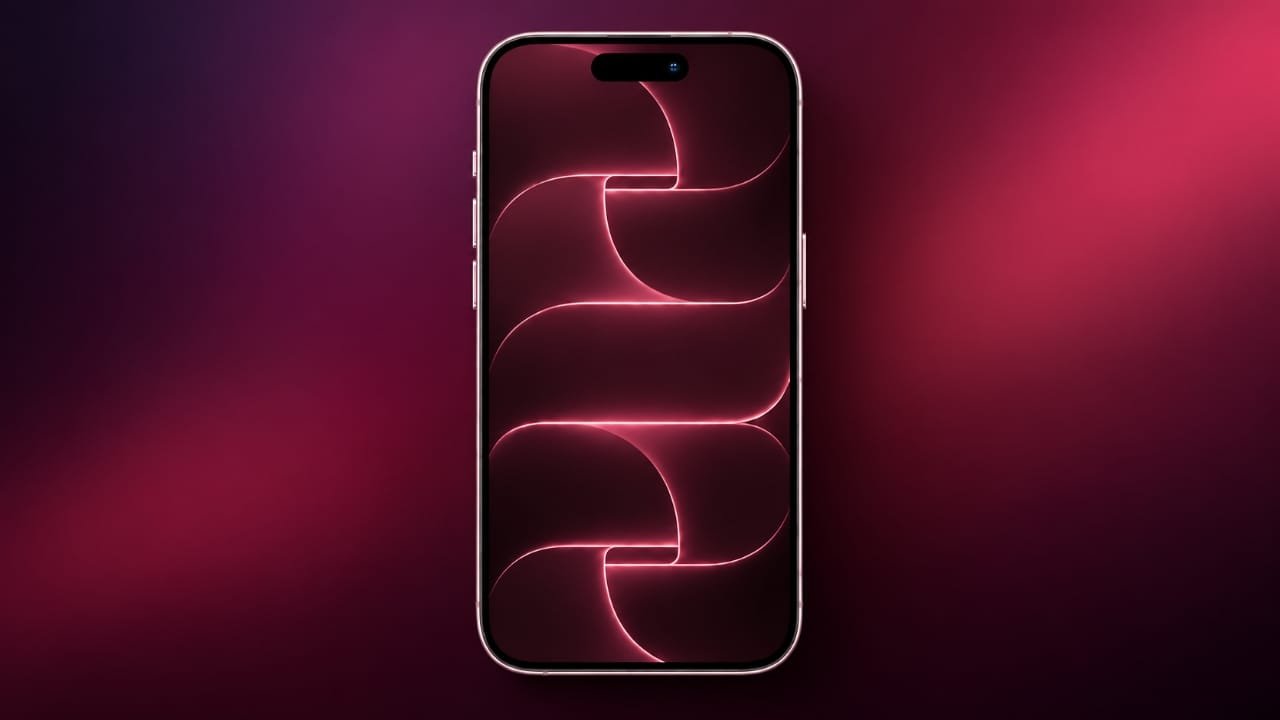
Apple’s latest Pro models come with a new set of wallpapers that match the company’s updated visual style. The good news is that you don’t need to buy an iPhone 18 Pro or iPhone 18 Pro Max to use them.
The wallpapers are available in four different colour themes, giving users several options for refreshing their phone’s home or lock screen.
Also read: iPhone 18 Pro Colors: Burgundy, Glacier, Silver and Black
iPhone 18 Pro Wallpapers Available in Four Colours
Apple introduced these wallpapers alongside its latest Pro lineup. They are designed for both the iPhone 18 Pro and iPhone 18 Pro Max, with the same four colour themes available on both models.
Advertisements
Each wallpaper is based around the colour of the corresponding Pro model. The designs have a clean and simple appearance, while a subtle “PRO” detail is incorporated into every background.
Here are the four wallpaper colours:
- Burgundy: A rich and bold design with a deeper colour tone.
- Glacier: A cool, lighter theme with a clean appearance.
- Black: A darker option with a simple and understated look.
- Silver: A brighter design inspired by Apple’s classic silver finish.
The Pro Max versions use the same overall designs but are adjusted for larger displays. This helps the wallpapers maintain their proportions and appearance on bigger screens.
A Closer Look at the Wallpaper Designs
The wallpapers may look simple at first, but they contain small details that become easier to notice when viewed at full resolution.
The colour treatment gives each version its own look, while the hidden “PRO” lettering adds a distinctive touch. The clean design also leaves enough space around app icons, making the wallpapers suitable for everyday use.
Another advantage is that these wallpapers can be used on older compatible devices as well. You can give your phone a newer Apple-inspired appearance without changing the hardware.
How to Download the iPhone 18 Pro Wallpapers
The currently available versions are static wallpaper images extracted from the iOS 27 Release Candidate. They are different from Apple’s dynamic wallpapers, which can respond to movement or other device interactions.




To save a wallpaper, follow these steps:
- Choose the wallpaper you want from the available collection.
- Open the image in its full-resolution version.
- Save the image to your phone or computer.
- On an iPhone, open the saved image in the Photos app.
- Select the option to use it as your wallpaper.
- Adjust the image position if required and apply it to your Lock Screen, Home Screen, or both.
You can also change your wallpaper directly through the iPhone’s Settings app and select the saved image from your photo library.
What About the iPhone Duo Wallpapers?
The current collection does not include the Duo wallpapers. The iOS 27 Release Candidate does not appear to contain those designs at this stage.
They could become available in a future software release, although their availability and timing would depend on Apple. For now, the collection is focused on the Pro and Pro Max wallpapers.
Also read: iPhone Duo Price in India: Storage Options, EMI, Offers and Specifications
Final Thoughts
The iPhone 18 Pro and Pro Max wallpapers bring a fresh visual style with four colour options: Burgundy, Glacier, Black, and Silver. The designs also include the subtle “PRO” detail that gives them a distinctive appearance.
If you like Apple’s latest Pro design but don’t have the newest iPhone, using these wallpapers is a simple way to give a compatible device a similar visual touch.

Jatin Rajput (Tech Golu) — Tech blogger & YouTuber with 6+ years of experience in WhatsApp, Instagram, Facebook, and mobile guides. Founder of TechGolu.in.