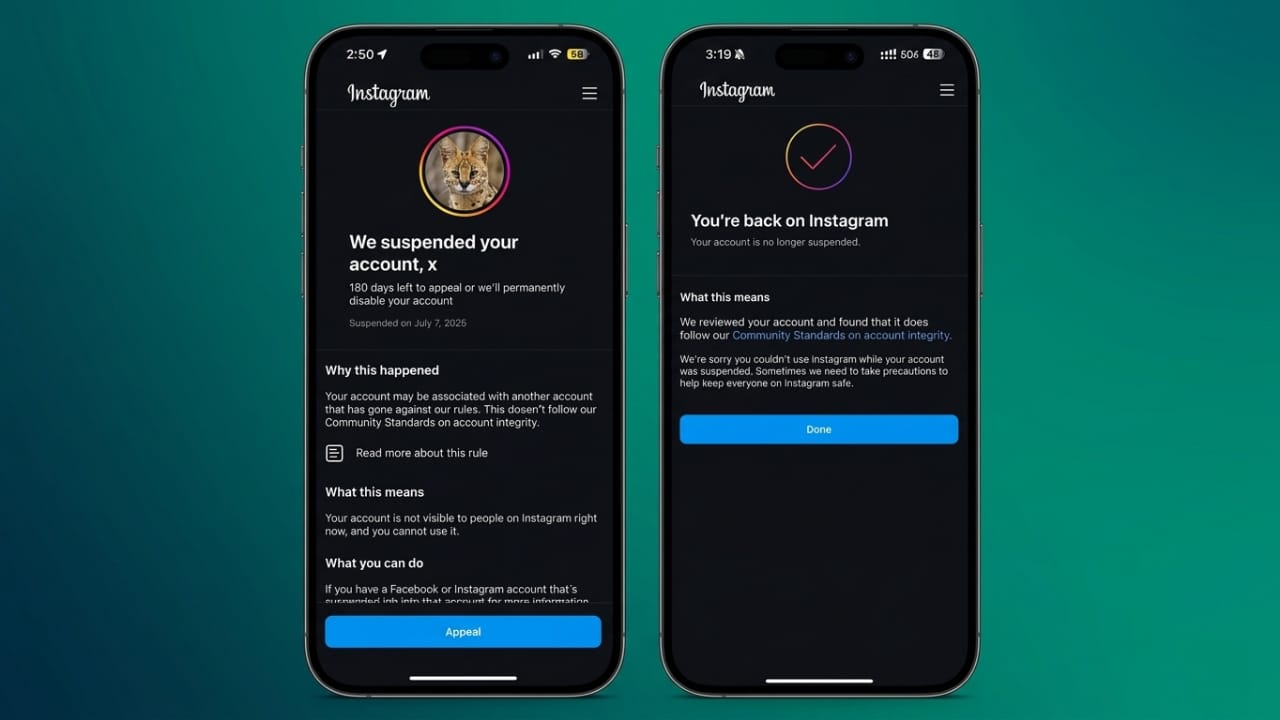
Losing access to an Instagram account can feel stressful, especially when no clear warning appears before the suspension. In recent months, many users, including creators, students, brands, and business owners, have reported sudden account restrictions or disabled profiles.
The good news is that Instagram and Meta provide official recovery options that may help restore access. Following safe recovery steps and avoiding risky behavior can also reduce the chances of future suspensions.
Also read: Instagram Removes End-to-End Encryption for Direct Messages
Why Instagram Suspends Accounts
Instagram usually restricts accounts that appear to break platform rules or show suspicious activity. In some situations, automated systems may mistakenly flag genuine users.
Common reasons include:
- Spam-like activity
- Repeated login attempts
- Using unauthorized third-party apps
- Automated bot activity
- Violating community guidelines
- Suspicious security behavior
If your account was disabled by mistake, Instagram allows users to request a review through official channels.
Start the Recovery Process Through the Instagram App
The first step is to try logging into your account normally through the Instagram app.
If your account has been suspended or disabled, you may see a message explaining the restriction. Instagram usually provides options like “Appeal” or “Learn More.”
Follow the instructions carefully and provide accurate information during the process.
In some cases, Instagram may ask for:
- Selfie verification
- Identity confirmation
- Government-issued ID documents
Always upload clear and genuine information. Incorrect details can slow down the review process.
Use Meta’s Official Recovery Support
Meta also provides official support tools for users facing account access problems.
These recovery forms can help with:
- Disabled accounts
- Hacked profiles
- Login problems
- Security-related restrictions
Many users are unaware of these official support options, but they can sometimes work better than repeated login attempts inside the app.
When filling out forms:
- Use your real account information
- Explain the issue clearly
- Avoid submitting multiple requests repeatedly
Check Your Email Carefully
Instagram often sends recovery instructions to the email linked with your account.
Sometimes these messages land in:
- Spam folder
- Junk folder
- Promotions tab
Check all folders regularly after submitting an appeal. Recovery links may expire after a limited time, so it is better to respond quickly.
Avoid Repeated Login Attempts
Many users panic and keep trying to log in from different devices or networks. This can sometimes trigger additional security checks.
To avoid further issues:
- Do not attempt constant logins
- Avoid using VPN services during recovery
- Use trusted devices and networks only
Staying patient during the review process is important.
Remove Unsafe Third-Party Apps
Some follower growth apps and automation tools violate Instagram’s policies.
These tools may:
- Access account data improperly
- Perform automated actions
- Trigger spam detection systems
If you previously connected such apps, remove them immediately from your account settings. This can improve account security and reduce future risks.
Enable Extra Security After Recovery
Once your account is restored, strengthen its protection immediately.
Important security steps include:
- Enable two-factor authentication
- Use a strong password
- Review connected devices regularly
- Remove unknown app permissions
Two-factor authentication adds an extra layer of protection against unauthorized access.
Important Recovery Steps to Follow
- Log into Instagram normally
- Tap the appeal or support option
- Complete verification requests carefully
- Upload valid identity proof if required
- Use Meta’s official support forms
- Monitor email and spam folders
- Avoid repeated login attempts
- Remove unsafe third-party apps
- Turn on two-factor authentication
Common Mistakes That Can Lead to Suspension
Many users unknowingly break Instagram rules while trying to grow faster. Certain activities may appear unnatural to Instagram’s automated systems.
Avoid Repetitive Comments
Posting the same comment repeatedly across multiple posts may look spammy.
Even manual comments can trigger restrictions if done excessively within a short period.
Instead:
- Write natural comments
- Engage meaningfully
- Avoid copy-paste replies
Do Not Use Instagram Bots
Follower bots and auto-like tools were once popular growth methods, but Instagram now detects automated behavior more effectively.
Using bots can result in:
- Temporary restrictions
- Reduced reach
- Account suspension
Fake engagement also harms long-term credibility.
Avoid Mass Following and Liking
Rapidly following hundreds of users or liking large numbers of posts may appear robotic.
Natural engagement works better over time and helps build a genuine audience.
Don’t Send Spam Messages
Sending repeated promotional messages to strangers may violate Instagram guidelines.
Instead of aggressive promotion:
- Focus on useful content
- Build trust naturally
- Interact respectfully with followers
Content That Can Trigger Restrictions
Instagram maintains strict rules for user safety and platform quality.
Never Share Harmful Content
Violent, threatening, or abusive material can lead to immediate action against an account.
Always maintain respectful communication online.
Respect Privacy
Avoid sharing private conversations, personal information, or confidential details without permission.
Protecting privacy helps create a safer online environment.
Avoid Adult or Explicit Material
Instagram does not allow explicit sexual content. Repeated violations can result in permanent restrictions.
Stay Away From Misleading Financial Promotions
Fake investment schemes, suspicious crypto promotions, and misleading earning claims may violate platform policies.
Always share trustworthy and transparent information.
Use Only Authorized Media
Uploading copyrighted videos or images without permission may trigger content removal or account penalties.
Use original content or properly licensed media whenever possible.
Safe Ways to Grow on Instagram
Growing an account safely takes time, but it creates stronger long-term results.
Use Approved Marketing Tools Only
Before using any Instagram tool or software:
- Verify its authenticity
- Check whether it follows Meta guidelines
- Avoid unknown automation services
Official partner tools are generally safer than random growth apps.
Use Automation Carefully
Some approved chatbot tools help businesses manage customer communication safely.
However, aggressive automation or spam-like behavior should always be avoided.
Focus on Organic Growth
Instagram rewards authentic engagement more than artificial growth tactics.
Good long-term strategies include:
- Posting useful content
- Building real connections
- Responding naturally to followers
- Staying consistent
Organic audiences are usually more loyal and engaged.
Safe Instagram Practices to Remember
- Use official recovery methods only
- Avoid fake recovery agents
- Never buy fake followers
- Remove risky third-party apps
- Follow Instagram community guidelines
- Use secure passwords and two-factor authentication
- Focus on genuine audience growth
Also read: How to Change Apple Watch Faces in 2026
Final Thoughts
If your Instagram account gets banned or suspended, always use official Instagram or Meta recovery options. Avoid shortcuts, fake support services, or risky automation tools that promise instant recovery.
Safe habits, authentic engagement, and strong account security can help protect your Instagram profile in the long run.

Jatin Rajput (Tech Golu) — Tech blogger & YouTuber with 6+ years of experience in WhatsApp, Instagram, Facebook, and mobile guides. Founder of TechGolu.in.