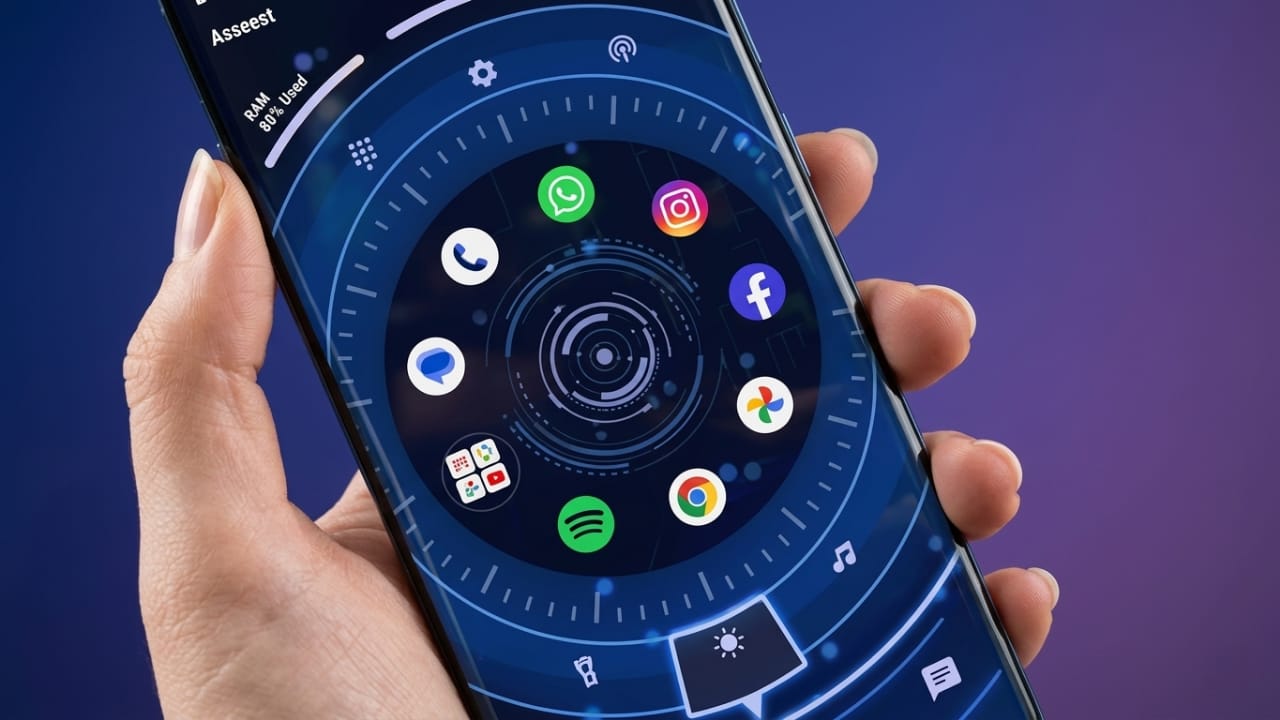
Android users often enjoy personalizing their phones to match their own style. While the default home screen works well, many people prefer a launcher that offers a fresh design and extra customization options. Orbit Launcher is one such app that combines modern visuals with smart features to give your device a completely new appearance.
Instead of simply changing icons, Orbit Launcher focuses on creating a futuristic experience with AI-powered tools, customizable layouts, and animated 3D themes. If you’re looking for a launcher that can make your Android phone feel more modern, this app is worth exploring.
Also read: Batix – Charging Photo: Personalize Your Android Charging Screen with Photos and Animations
What is Orbit Launcher?
Orbit Launcher is an Android home screen replacement that lets you redesign the look and feel of your device. It offers a collection of futuristic themes, interactive animations, customizable widgets, and personalization settings.
The launcher is designed for users who enjoy modern interfaces inspired by technology, digital dashboards, and science-fiction style designs.
Modern 3D HUD Themes
One of the standout features of Orbit Launcher is its collection of 3D HUD (Heads-Up Display) themes. These themes give your home screen a high-tech appearance with stylish visual elements.
Some of the design highlights include:
- Futuristic layouts
- Animated effects
- Digital dashboard-inspired interface
- Modern icon packs
- Smooth screen transitions
- Eye-catching home screen design
These themes can help give even an older Android device a refreshed and premium-looking interface.
AI-Based Smart Features
Orbit Launcher also includes AI-powered tools that aim to improve everyday phone usage. Depending on your activity and settings, the launcher may organize your apps and suggest quick access to frequently used features.
Some useful AI functions include:
- Displaying frequently used apps
- Smart app suggestions
- Faster access to common tasks
- Personalized home screen experience
- Better organization based on usage
These features are designed to make navigation more convenient while reducing the time spent searching for apps.
Easy Home Screen Personalization
Customization is one of the biggest reasons people install Android launchers, and Orbit Launcher offers plenty of options.
You can personalize your device by:
- Changing icon size
- Adjusting the home screen grid
- Applying different themes
- Selecting font styles
- Editing transition animations
- Setting custom wallpapers
This flexibility allows users to create a home screen that matches their personal preferences.
Useful Widget Support
Orbit Launcher supports a variety of widgets, allowing important information to remain visible without opening multiple apps.
Common widgets include:
- Weather updates
- Calendar
- Digital or analog clock
- Battery information
- Device status
- Quick shortcuts
Widgets help keep essential information available directly from the home screen.
Smooth Navigation and Performance
A launcher should not only look good but also perform efficiently. Orbit Launcher is designed to provide responsive navigation and smooth animations on many Android devices.
Users may notice benefits such as:
- Faster app access
- Smooth scrolling
- Responsive gestures
- Fluid animations
- Reduced interface lag on compatible devices
Actual performance may vary depending on your phone’s hardware and Android version.
Give Your Phone a Premium Look
You don’t always need a flagship smartphone to enjoy an attractive interface. Orbit Launcher allows many Android devices to achieve a cleaner and more stylish appearance through its themes and customization tools.
It is especially suitable for users who enjoy:
- Futuristic designs
- Technology-inspired interfaces
- Mobile customization
- Gaming-style themes
- Creative home screen layouts
Better Organization and User Experience
A well-organized home screen can make everyday phone use more convenient. Orbit Launcher includes tools that help arrange apps, widgets, and shortcuts in a cleaner way.
Some advantages include:
- Easier access to important apps
- Less home screen clutter
- Better organization
- Improved navigation
- Personalized layout
Why Choose Orbit Launcher?
Here are some reasons why many Android users consider trying Orbit Launcher:
- AI-assisted features for smarter navigation
- Modern 3D HUD-inspired themes
- Extensive customization options
- Widget compatibility
- Smooth animations
- Stylish user interface
- Personalized home screen layouts
- Premium visual experience
Who Should Use Orbit Launcher?
Orbit Launcher may be a good option for:
- Android customization enthusiasts
- Students
- Professionals
- Mobile gamers
- Content creators
- Tech enthusiasts
- YouTubers
- Users who enjoy unique phone designs
Anyone who wants to refresh the appearance of their Android device may find this launcher useful.
Pros
- Attractive futuristic themes
- AI-powered convenience features
- Wide customization options
- Smooth interface on compatible devices
- Widget support
- Modern animations
- Clean and organized layout
- Premium visual design
Cons
- Some visual effects may require more system resources.
- Older devices may not perform as smoothly with advanced animations.
- Exploring all customization options may take some time.

Also read: Battery Charging Animation 4K: Make Your Phone’s Charging Screen More Stylish
Final Thoughts
Orbit Launcher offers much more than a basic home screen replacement. With its futuristic themes, AI-powered features, widget support, and extensive customization options, it provides Android users with many ways to personalize their devices.
If you enjoy experimenting with your phone’s appearance and want a modern interface without buying a new device, Orbit Launcher is worth considering. Before installing, it’s always a good idea to check the app’s compatibility, permissions, user reviews, and latest updates to ensure it meets your needs.

Jatin Rajput (Tech Golu) — Tech blogger & YouTuber with 6+ years of experience in WhatsApp, Instagram, Facebook, and mobile guides. Founder of TechGolu.in.