
In today’s digital world, smartphones have become an essential part of our daily lives. We use our mobile phones not only for calling and messaging but also for capturing special moments through photos and videos. Whether it is traveling, family gatherings, nature photography, or social media content, mobile photography plays a very important role.
However, not every smartphone comes with a high-quality camera. Many users feel disappointed after taking photos because the colors look dull, the sky appears gray, or the overall image does not look attractive. This is where photo filter and camera enhancement apps become very useful.
Today, in this article, we are going to talk about a popular Android application called Picnic – Best Photo Filter for Dark Sky & Outdoor Camera Filter. This app is specially designed for outdoor photography and sky enhancement. With the help of smart filters and AI-based processing, Picnic can improve the overall appearance of your photos and make them look more natural and visually appealing.
Also read: X Camera – High-Quality Photography HD Camera for Android (Complete Review & User Guide)
What Is Picnic App?
Picnic is an Android photo filter application developed to enhance outdoor photos, especially images with skies, clouds, greenery, and natural backgrounds. The app focuses on improving sky colors, weather effects, and background tones using advanced AI analysis.
Unlike heavy photo editing apps that require manual adjustments, Picnic works mostly with one-tap filters. You simply select a filter, and the app automatically analyzes your photo and applies suitable enhancements. This makes the app beginner-friendly and easy to use for everyone.
Whether you take photos in cloudy weather, rainy conditions, or dull lighting, Picnic helps improve the look of your images without making them look artificial.
Why Picnic App Is Useful for Mobile Photography
Many mobile photos look flat due to poor lighting or weather conditions. Picnic solves this problem by offering ready-made outdoor filters that enhance:
- Sky color
- Cloud texture
- Greenery brightness
- Overall photo mood
This makes your photos suitable for sharing on social media platforms like Instagram, Facebook, and WhatsApp, or even for personal memories.
Key Features of Picnic App
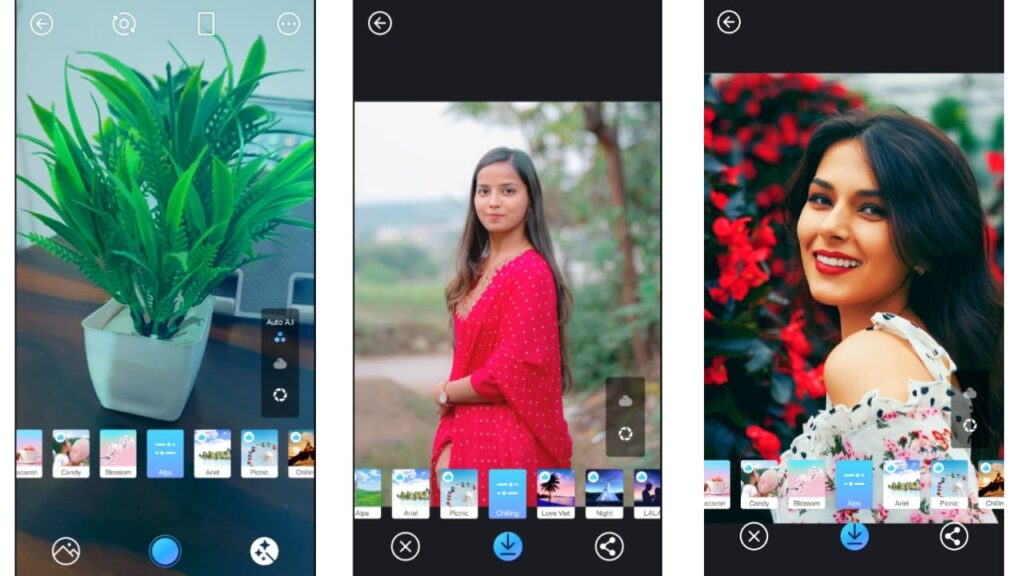
Below are the main features of the Picnic photo filter app:
1. 30+ Outdoor Camera Filters
Picnic provides more than 30 specially designed filters focused on outdoor photography. Each filter offers a different mood and color tone, making it easy to choose the best look for your photo.
2. Sky Color Enhancement
One of the strongest features of Picnic is its ability to change and enhance sky colors. Even if the sky looks dull or cloudy, the app can make it look brighter and more attractive.
3. AI-Based Auto Analysis
The app uses AI technology to automatically detect sky, background, and objects in your photo. Based on this analysis, the filter is applied in a natural way without damaging the image quality.
4. Gallery Photo Editing
You can select any existing photo from your phone’s gallery and apply Picnic filters to it. This feature is useful for improving old photos as well.
5. Real-Time Camera Filters
Picnic allows you to apply filters in real time while taking photos. This means you can preview the final look before clicking the picture.
6. Custom Filter Adjustment
Some filters can be customized according to your preference. You can adjust intensity levels to get a balanced and natural result.
7. Photo Beauty Options
The app includes basic photo beauty enhancements that improve the overall appearance without over-editing.
8. Simple and User-Friendly Interface
The app has a clean and simple interface, making it easy for beginners to use without any technical knowledge.
How to Download Picnic App on Android
Follow these simple steps to download the Picnic app on your Android phone:
- Open the Google Play Store on your Android device.
- In the search bar, type “Picnic – Best Photo Filter for Dark Sky”.
- Click on the app from the search results.
- Tap on the Install button.
- Wait for the app to download and install automatically.
- Once installed, open the app and allow necessary permissions.
How to Use Picnic App (Step-by-Step Guide)
Using Picnic app is very easy. Below is a complete step-by-step guide:
Step 1: Open the App
After installation, open the Picnic app on your phone.
Step 2: Choose Photo Source
You will see two main options:
- Camera
- Gallery
Step 3: Use Gallery Option
If you select Gallery, you can choose an existing photo from your phone and apply different filters to it.
Step 4: Use Camera Option
If you select Camera, the app will open your phone’s camera with real-time filters enabled.
Step 5: Select a Filter
Browse through the available 30+ filters. Each filter shows a preview, so you can see how the photo will look before capturing it.
Step 6: Capture or Save Photo
Once you are satisfied with the filter, capture the photo or save the edited image to your gallery.
Step 7: Share Your Photo
You can now share your enhanced photo on social media or keep it for personal use.
Pros of Picnic App
- Easy to use
- No complex editing required
- Specially designed for outdoor photography
- AI-powered sky enhancement
- Real-time camera filters
- Lightweight and smooth performance
Cons of Picnic App
- Limited advanced manual editing
- Some features may require internet
- Not designed for indoor or portrait-heavy editing
Install
Is Picnic App Safe to Use?
Yes, Picnic is a safe application available on the Google Play Store. It does not promote any illegal content and follows standard Android app policies. However, always download apps from official sources and review permissions before use.
Disclaimer:
Picnic app is owned by its respective developer. This website is not affiliated with the app developer. All trademarks, logos, and app names belong to their respective owners. Information provided here is for educational and informational purposes only.
Also read: Pika Charging Animation Show – Add Your Picture on Battery Charging Screen (Android)
Final Verdict
Picnic – Best Photo Filter for Dark Sky is a useful Android app for users who love outdoor photography and want to improve the appearance of their photos without complex editing. With AI-powered filters, sky enhancement, and an easy-to-use interface, Picnic is a good option for beginners as well as casual photographers.
If you often take photos of nature, travel locations, or outdoor scenes, this app can help you make your pictures look more vibrant and appealing.

Jatin Rajput (Tech Golu) — Tech blogger & YouTuber with 6+ years of experience in WhatsApp, Instagram, Facebook, and mobile guides. Founder of TechGolu.in.