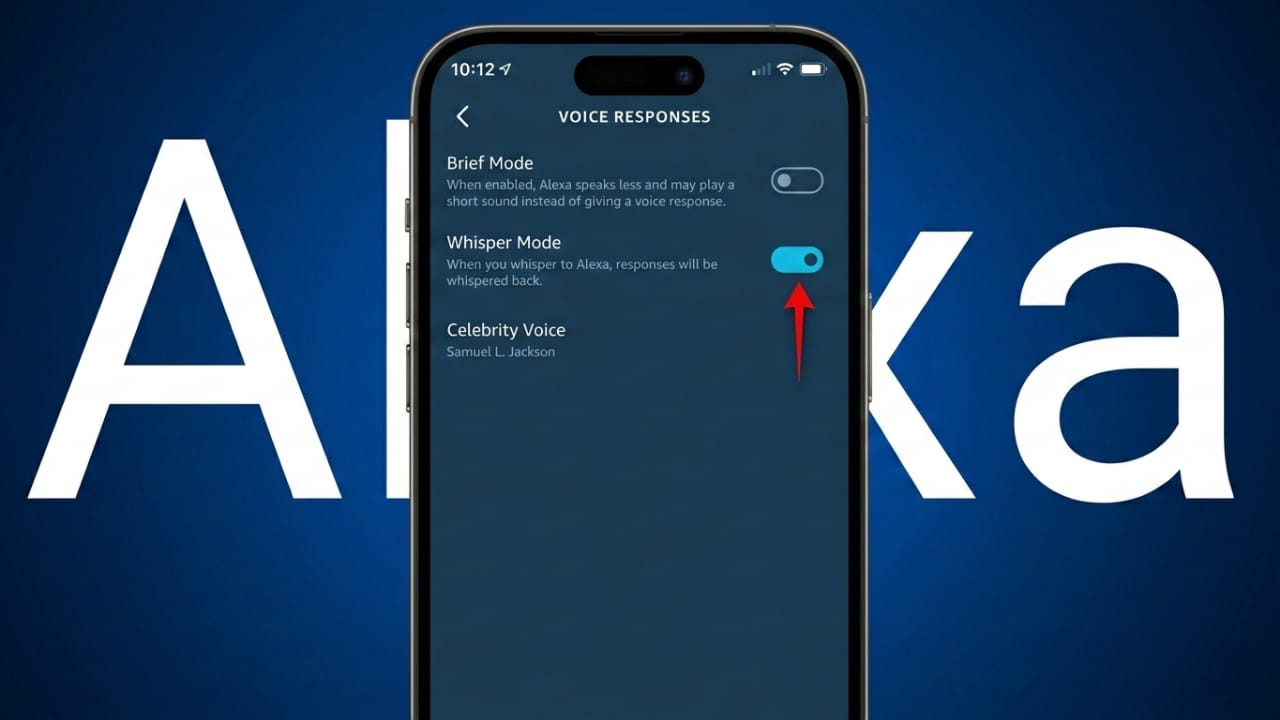
Smart speakers are helpful in everyday life, but sometimes their responses can be too loud—especially late at night. To solve this problem, Amazon Alexa includes a feature called Whisper Mode.
With Whisper Mode enabled, you can speak softly to Alexa and she will respond in a whisper as well. This allows you to use voice commands without disturbing others in the room. It is especially useful at night or in quiet environments where loud responses might wake someone up.
Below is a simple guide explaining what Whisper Mode is, why it is useful, and how to enable it.
Also read: How to Reset an Android Phone Without Losing Your Data
What Is Alexa Whisper Mode?
Whisper Mode is a built-in feature on supported Echo devices that allows Alexa to detect when you speak quietly. When Alexa recognizes a whisper, she automatically replies in a soft whisper instead of using her normal voice.
This feature helps maintain a peaceful environment in your home. You don’t need to adjust the speaker volume or walk over to the device. Simply whisper your command and Alexa will answer in the same quiet tone.
The feature is currently available in regions such as the United States and the United Kingdom and works on many Echo devices.
Why Whisper Mode Is Useful
Before Whisper Mode existed, using Alexa late at night could be inconvenient. The assistant required clear and normal-volume commands, which often meant speaking loudly enough for the device to hear you.
For example, imagine it is midnight and you suddenly remember that you forgot to set your morning alarm. If Alexa is across the room, speaking normally might wake someone sleeping nearby.
Without Whisper Mode, users often had to:
- Walk to the device
- Lower the volume manually
- Give the command clearly
- Adjust the volume again later
Whisper Mode removes these extra steps. You can stay where you are and simply whisper your request. Alexa understands the quieter speech and replies softly.
How to Turn On Whisper Mode Using Voice
The quickest way to enable this feature is through a simple voice command.
Just say:
“Alexa, turn on Whisper Mode.”
Alexa will confirm that the feature has been activated.
If you want to disable it later, you can say:
“Alexa, turn off Whisper Mode.”
This method takes only a few seconds and requires no additional setup.
How to Enable Whisper Mode Using the Alexa App
You can also activate Whisper Mode through the Alexa mobile app.
Follow these steps:
- Open the Amazon Alexa app on your phone.
- Tap the More option in the bottom menu.
- Select Settings.
- Scroll down and choose Voice Responses.
- Turn on the Whisper Mode toggle.
Once it is enabled, Alexa automatically detects when you whisper and adjusts her response accordingly. You do not need to activate the feature again each time.
Devices That Support Whisper Mode
Whisper Mode works on many Amazon Echo devices. Models such as the Echo Dot usually provide very good results because of their microphone design.
However, performance can vary depending on several factors:
- The specific Echo device model
- Distance from the speaker
- Background noise in the room
- Placement of the device
Keeping your device software updated can also help ensure the feature works properly.
How Alexa Recognizes Whispered Speech
Whispered speech is different from normal speech. When people whisper, their vocal cords do not vibrate the same way they do when speaking normally. This changes the sound characteristics.
Because of this difference, detecting whispers can be more challenging for voice recognition systems.
To handle this, Alexa uses advanced machine learning technology that analyzes patterns in audio signals. The system studies the sound characteristics of quiet speech and learns how to distinguish whispers from normal conversation.
These systems also monitor pauses and silence in speech to determine when a command has finished. This helps Alexa understand quiet voice input more accurately.
Connection With Other Alexa Sound Features
The audio recognition technology used for Whisper Mode also supports other Alexa features designed to detect sounds in the environment.
For example, some Alexa features can recognize important household alerts such as:
- Smoke alarm sounds
- Carbon monoxide alarm alerts
- The sound of breaking glass
By analyzing different sound patterns, Alexa can respond appropriately to various situations.
Real-World Performance
Most users find Whisper Mode to be accurate and natural. When Alexa replies in whisper form, the voice is soft and calm rather than robotic.
If Alexa does not understand your whisper, she will usually respond quietly with a message such as:
“Sorry, I didn’t get that.”
For best results:
- Stand closer to the device when whispering
- Use the feature in a relatively quiet room
- Reduce background noise from televisions or music
Distance and noise can sometimes make whisper detection more difficult.
Ideal Situations for Using Whisper Mode
1. Late-Night Voice Commands
Whisper Mode is perfect for bedtime situations. You can quietly ask Alexa to:
- Set an alarm
- Check the weather
- Ask the current time
- Turn off lights
All responses stay soft and low in volume.
2. Helpful for Parents
Parents often find this feature useful during nighttime routines with babies. Loud responses from smart speakers can easily disturb a sleeping child.
With Whisper Mode, you can quietly:
- Control lights
- Play gentle music
- Stop alarms
- Check reminders
The environment stays calm and quiet.
3. Shared Living Spaces
If you live with roommates or family members, Whisper Mode can also help maintain peace during late hours.
You can still control smart home devices such as:
- Lights
- Thermostats
- Fans
- Door locks
All commands remain quiet, reducing disturbances for others nearby.
An Optional Feature You Control
Whisper Mode is completely optional. If you decide you no longer need it, you can easily turn it off using either a voice command or the Alexa app.
The goal of this feature is simple: make Alexa interactions more natural and considerate in quiet situations.
Also read: Fix Snapchat Login Problems: 13 Simple Solutions That Work (2026 Guide)
Final Thoughts
Whisper Mode adds a thoughtful touch to the Alexa experience. By recognizing soft speech and responding quietly, the assistant becomes easier to use during nighttime or in calm environments.
You can enable the feature in seconds using a voice command or the Alexa app. Once activated, Alexa automatically detects whispers and adjusts her response.
For households where silence matters—whether late at night, around sleeping children, or in shared spaces—Whisper Mode provides a simple and convenient solution.

Jatin Rajput (Tech Golu) — Tech blogger & YouTuber with 6+ years of experience in WhatsApp, Instagram, Facebook, and mobile guides. Founder of TechGolu.in.