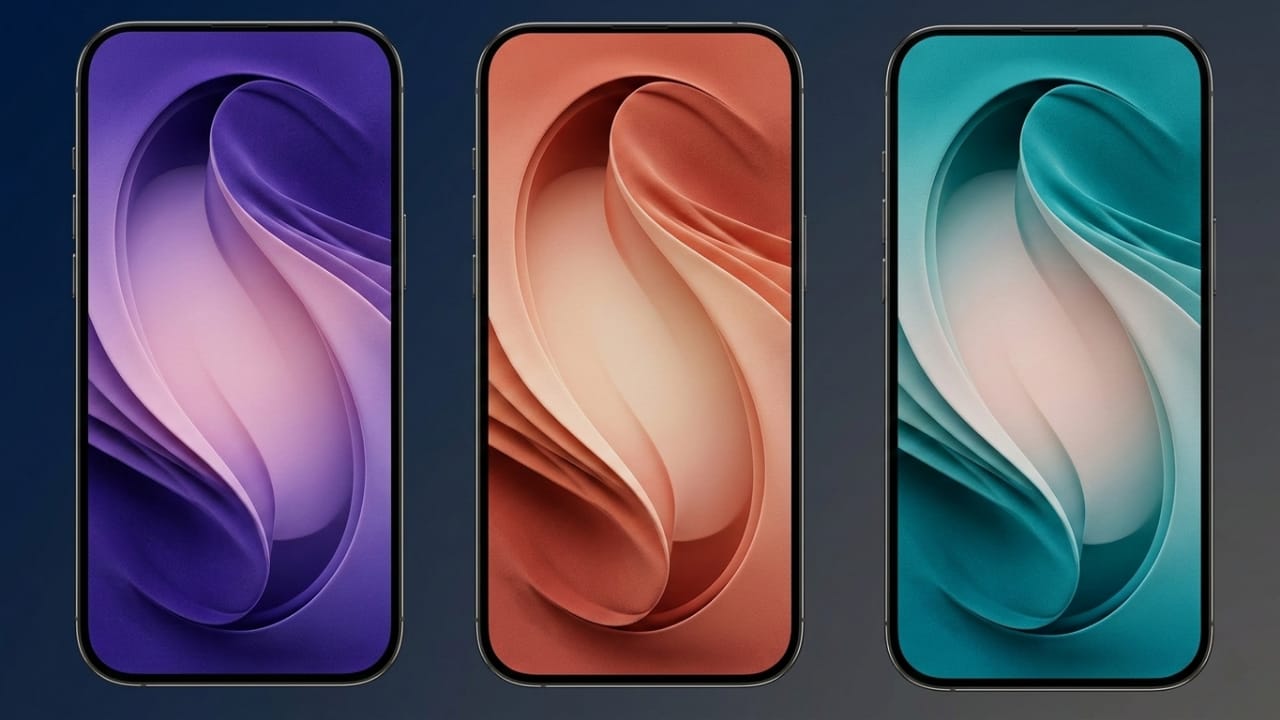
Samsung has introduced its latest flagship lineup, the Galaxy S26 series, and as expected, the phones come with a new set of stylish wallpapers. These official wallpapers are designed to match the premium look of the device.
The good news is that you don’t need to own the phone to use them. You can download the wallpapers and apply them to almost any smartphone to give your screen a fresh appearance.
Changing your wallpaper is one of the easiest ways to refresh the look of your phone. A clean, well-designed background can instantly make your device feel new again.
Also read: How to Enable Whisper Mode on Alexa for Quiet Voice Control
Design Style of the Galaxy S26 Ultra Wallpapers
The wallpapers used in the Galaxy S26 Ultra follow Samsung’s familiar design approach. They feature a subtle abstract “S” shape, which represents the Galaxy S series branding.
The overall style is simple, modern, and minimal. Instead of complex patterns, the design focuses on smooth shapes and elegant color tones. This makes the wallpapers look clean while keeping icons and widgets easy to see.
Although the design pattern remains the same across all wallpapers, the color changes depending on the device variant.
Available Wallpaper Colors
Samsung has released multiple color options that match the official finishes of the phone. Each color version comes with a slightly different wallpaper tone.
Available options include:
- Cobalt Violet
- Sky Blue
- Black
- White
- Silver Shadow
- Pink Gold
These colors are carefully balanced to give the wallpapers a premium and polished look. The shades are vibrant without being distracting, which helps create a smooth and comfortable viewing experience.
4K Resolution for Sharp Display
All Galaxy S26 Ultra wallpapers are available in full 4K resolution. This means the images remain sharp and detailed even on large displays.
They work well on:
- Android smartphones
- iPhones
- Tablets
- Devices with AMOLED displays
AMOLED screens in particular can show deeper contrast and richer colors, which makes these wallpapers look even better.
One important tip: avoid saving preview images from websites, because they are often compressed to reduce page loading time. Compressed images can lose clarity.
Instead, download the original full-resolution files to enjoy the best quality.
How to Download the Wallpapers
Downloading the wallpapers is simple.
- Open the download link provided with the wallpaper previews.
- This will take you to a Google Drive folder containing the original files.
- Choose the wallpaper you like.
- Download the image in full resolution.
Once downloaded, the file will be saved on your device and ready to use.
How to Set the Wallpaper on Android
Applying the wallpaper on an Android phone usually takes just a few steps.
- Open Settings on your phone.
- Tap Wallpaper & Style.
- Select More Wallpapers or choose from your gallery.
- Locate the downloaded Galaxy S26 wallpaper.
- Adjust the image position if needed.
- Tap Set Wallpaper.
- Choose whether to apply it to the Home screen, Lock screen, or both.
On some Android phones, you can also set the wallpaper by opening the image directly from the Gallery and selecting the Set as wallpaper option.
How to Set the Wallpaper on iPhone
You can also use these wallpapers on an iPhone.
Follow these steps:
- Open Settings.
- Tap Wallpaper.
- Select Add New Wallpaper.
- Choose the downloaded image from your photos.
- Adjust the positioning if needed.
- Tap Add.
- Select Set as Wallpaper Pair to apply it to both the lock screen and home screen.
You can customize each screen separately if you prefer.
Why These Wallpapers Stand Out
Samsung’s wallpapers usually follow a consistent design style, and the S26 series continues that approach.
What makes them appealing:
- Minimal and clean design
- Colors matched to the device finishes
- High-resolution 4K quality
- Works well with icons and widgets
- Looks good on most modern displays
Because the design is simple, the wallpapers don’t clutter the screen. This keeps your home screen organized and visually balanced.
Also read: How to Mirror Your Apple Watch on Your iPhone (Step-by-Step Guide)
Final Thoughts
If you want to refresh the look of your phone, the Samsung Galaxy S26 Ultra wallpapers are a great option. They offer a modern design, soft color tones, and full 4K quality.
You can download and use them on both Android and iPhone devices, so there’s no need to upgrade your phone to enjoy the new style.
Just download the wallpaper, set it on your device, and give your screen a clean, updated look in seconds.

Jatin Rajput (Tech Golu) — Tech blogger & YouTuber with 6+ years of experience in WhatsApp, Instagram, Facebook, and mobile guides. Founder of TechGolu.in.