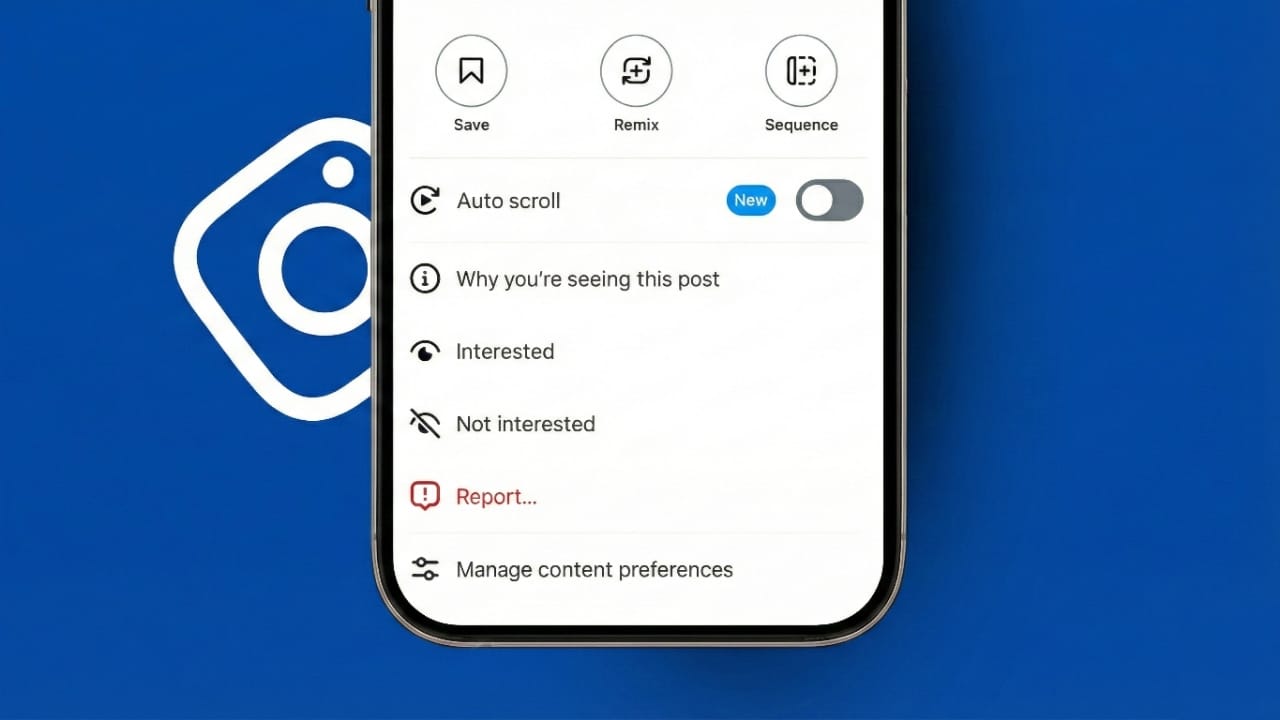
Auto Scroll on Instagram Reels makes watching short videos easier than ever. With this feature turned on, Reels play one after another without any swiping. You can sit back and enjoy a smooth, continuous viewing experience.
This update was introduced by Instagram to reduce effort during long watching sessions. It helps users stay relaxed, especially when they want to watch videos hands-free. Below is a clear and simple guide that explains what Auto Scroll is, why it exists, and how to use it.
Also read: How Instagram’s Collaborative Posts Feature Helps Creators Grow
What Does Auto Scroll on Instagram Reels Mean?
Auto Scroll is a playback option for Reels. When it is enabled, the next video starts automatically as soon as the current one ends. You no longer need to swipe up to move forward.
This creates a natural flow between videos. Watching feels smooth and uninterrupted. The feature is ideal for passive viewing, where you just want content to keep playing without touching the screen.
Instagram designed Auto Scroll to keep the viewing experience calm and immersive. Small breaks caused by manual swiping are removed, making Reels easier to enjoy for longer periods.
Why Instagram Added Auto Scroll
Many users watch Reels for long stretches. Repeated swiping can feel tiring after some time. Auto Scroll solves this problem by removing the need for constant hand movement.
Short videos are meant to be watched continuously. Other platforms already support similar viewing styles, so Instagram introduced this option to match modern habits. It also helps users who like to multitask, such as watching Reels while resting or doing light work.
The main goal is comfort. Whether someone watches a few videos or many, Auto Scroll makes the process simpler and more relaxed.
How to Enable Auto Scroll on Instagram Reels
Turning on Auto Scroll is quick and simple:
- Open the Instagram app on your phone.
- Go to the Reels section and open any Reel in full screen.
- Tap the three-dot menu on the screen.
- Look for the Auto Scroll option.
- Turn the toggle on.
Once enabled, Reels will start playing continuously. No swiping is needed. If you want to turn it off later, follow the same steps and disable the toggle. You stay fully in control.
Important Things to Know
- Auto Scroll works only on the mobile app.
- It is not available on Instagram Web or desktop browsers.
- Make sure your app is updated to the latest version.
- Some users may not see the option right away.
Instagram releases new features in stages. This means availability can vary by region or account. Sometimes, simply waiting is the only solution.
Device and Platform Availability
Mobile Phones
Auto Scroll is designed mainly for mobile users. It is being rolled out slowly across different countries. Some iPhone users may see it earlier, while Android users will receive it as the rollout expands.
Desktop and Web
Auto Scroll is not supported on desktop or web versions. Manual scrolling is still required there. Instagram has not shared any plans for desktop support yet.
Using Auto Scroll on Mac
Mac users can still experience Auto Scroll by using iPhone mirroring. If Auto Scroll is enabled on the iPhone, the same behavior appears on the mirrored screen. Reels will play automatically just like on the phone.
What to Do If Auto Scroll Is Missing
If you cannot find the Auto Scroll option, there is usually no problem with your account. Try these steps:
- Update the Instagram app
- Restart the app
- Log out and log back in
- Make sure Reels are opened in full screen
If the option still does not appear, it likely means the feature has not reached your account yet. Instagram activates features gradually, so patience is sometimes required.
How Auto Scroll Changes the Viewing Experience
Benefits
Auto Scroll makes watching Reels more comfortable. Transitions between videos feel smooth. Your hands get a break, and multitasking becomes easier. Long viewing sessions feel less tiring and more enjoyable.
Possible Drawbacks
Some users prefer manual control and may feel Auto Scroll encourages over-watching. However, the feature can be turned off at any time. Both viewing styles are available, so users can choose what suits them best.
Other New Instagram Updates
New 3:4 Photo Format
Instagram now supports a 3:4 vertical photo format. This size fits modern smartphone cameras better and makes photos look taller and more engaging. It works for single images and carousel posts.
Features Under Testing
Instagram is also testing new tools like AI-based editing, smarter search options, and better feed controls. These updates aim to improve content discovery and give users more personalized experiences.
Also read: How to Hide or Show the Threads Badge on Instagram (Updated 2025 Guide)
Final Thoughts
Auto Scroll on Instagram Reels is a simple but powerful improvement. It removes the need for constant swiping and makes video watching more relaxed. The feature supports hands-free viewing and fits perfectly with today’s content habits.
As Instagram continues to add new formats and smarter tools, the platform feels smoother and more enjoyable. Auto Scroll is a small change, but it makes a big difference in everyday use.

Jatin Rajput (Tech Golu) — Tech blogger & YouTuber with 6+ years of experience in WhatsApp, Instagram, Facebook, and mobile guides. Founder of TechGolu.in.