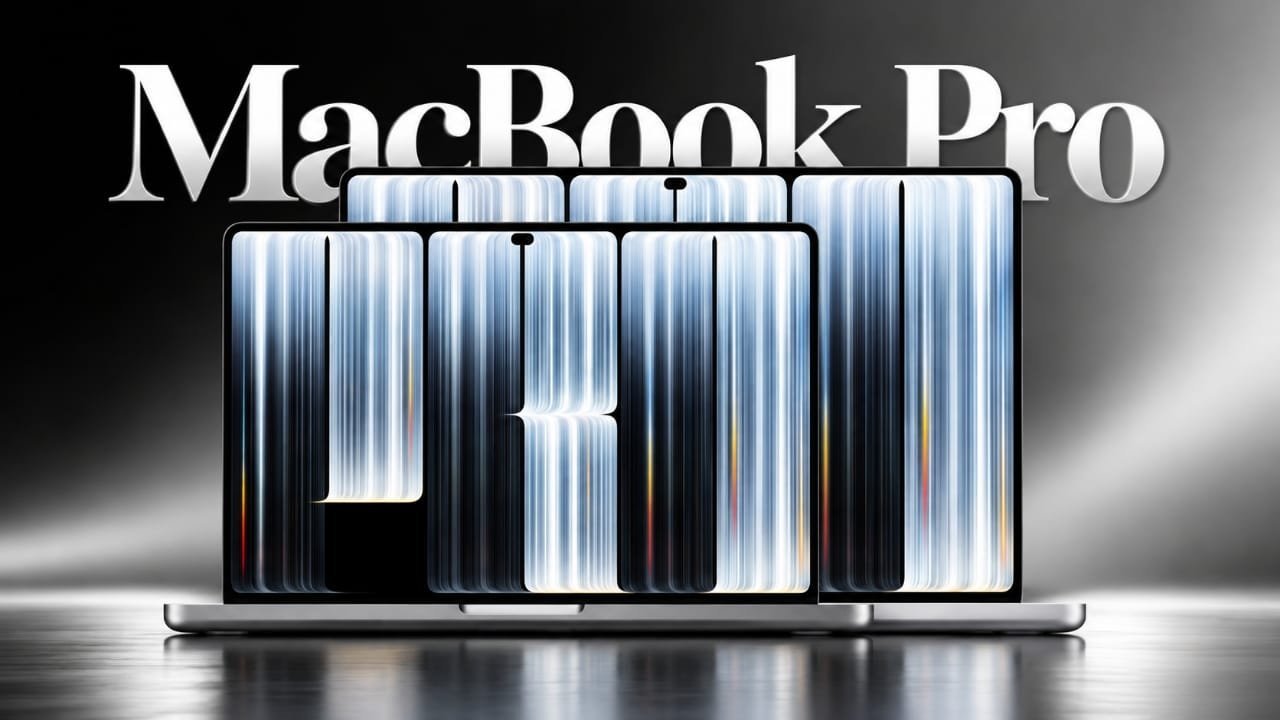
Apple’s latest MacBook Pro with PROLED XDR Display introduces a new wallpaper featuring bold “PRO” lettering against a deep black background. The design uses fine light patterns and subtle colours to create a modern look. If you like this artwork, you can download the wallpaper in full resolution and use it on your Mac, Windows PC, iPhone or Android device.
Apple announced the new MacBook Pro on October 28, 2026, alongside the 14-inch MacBook Pro powered by the M6 chip. Both models are scheduled to become available in India on November 6.
Also read: Apple MacBook Pro M6 Launched in India: Price, Specifications and Sale Date
MacBook Pro PROLED XDR Wallpaper Download (4K)
The wallpaper is available in 3840 × 2160 pixel resolution, making it suitable for 4K monitors, desktop computers and other high-resolution displays.
Advertisements
To save the image, open the wallpaper using the image link provided above and select the download or save option on your device. The original resolution helps preserve the fine details and sharp lines of the design.

Design and Appearance of the New Wallpaper
The new MacBook Pro wallpaper has a dark and minimal appearance. Its main design consists of numerous thin vertical lines in white, silver and bluish-grey shades. These lines come together to create the letters “PRO” across the screen.
The artwork also includes small sections of black space that break up the light patterns. A few orange, red and blue accents add colour without making the overall design look too bright.
The combination of a black background and detailed light effects gives the wallpaper a distinctive appearance. It is particularly suited to OLED displays, although it can also be used on standard LCD screens.
MacBook Pro With PROLED XDR Display: Specifications
The MacBook Pro with PROLED XDR Display is a separate model from the M6-powered MacBook Pro. It is positioned higher in Apple’s laptop lineup and introduces touchscreen functionality to the MacBook range.
Here is a look at its key specifications based on the announced details:
| Feature | Details |
|---|---|
| Display sizes | 14.2-inch and 16.2-inch |
| Display technology | Tandem OLED with touch support |
| Refresh rate | 10Hz–120Hz ProMotion |
| Peak brightness | Up to 2,000 nits |
| Camera | 12MP Center Stage with Dynamic Island |
| Processor | M5 Pro or M5 Max |
| Starting memory | 24GB |
| Starting storage | 1TB |
| Maximum memory | 128GB |
| Maximum storage | 16TB |
| Starting price in India | ₹3,49,900 |
| Availability | November 6, 2026 |
For buyers who are more interested in the latest processor and do not need a touchscreen or OLED display, the 14-inch MacBook Pro with the M6 chip is another option. Its starting price in India is ₹2,39,900.
How to Set the Wallpaper on a Mac
After downloading the image, follow these steps to use it as your Mac desktop background:
- Save the wallpaper to your Mac.
- Open System Settings.
- Select Wallpaper from the sidebar.
- Click Add Photo and locate the downloaded image.
- Select the image to apply it as your desktop wallpaper.
- Adjust the display option if needed to fit the screen.
You can also open Finder, right-click the downloaded image and select Set Desktop Picture.
How to Set the Wallpaper on Windows, iPhone and Android
You do not need a MacBook to enjoy this wallpaper. It can also be used on Windows computers and smartphones.
Windows 11
- Download the wallpaper to your computer.
- Find the saved image in File Explorer.
- Right-click the image.
- Select Set as desktop background.
iPhone
- Open the downloaded image in the Photos app.
- Tap the Share icon.
- Select the option to use the image as wallpaper.
- Adjust its position and zoom level.
- Apply it to your Lock Screen or Home Screen.
Android
- Open the image in Google Photos or your phone’s Gallery app.
- Tap the three-dot menu.
- Select Use as or Set as wallpaper.
- Adjust the image according to your screen.
- Confirm your selection.
Since the wallpaper has a wide 16:9 layout, smartphones may crop some parts of the image. You can move and resize it to keep the central PRO lettering visible.
Frequently Asked Questions (FAQs)
1. Is this the official MacBook Pro PROLED XDR wallpaper?
The design is the artwork featured in the MacBook Pro with PROLED XDR Display launch images. Apple has not provided a separate download link for the wallpaper on its official website. This version is shared in 4K resolution for personal use.
2. Can I use this wallpaper on an older MacBook?
Yes. The wallpaper is a standard image file, so it can be used on older Intel-based MacBooks as well as Apple silicon models.
3. Is the wallpaper compatible with Windows laptops?
Yes. Download the image and use the desktop background option in Windows settings or File Explorer.
4. Can I use this wallpaper on an Android phone or iPhone?
Yes. Both Android and iOS support image-based wallpapers. You may need to adjust the image because its original aspect ratio is designed for a widescreen display.
5. Which MacBook Pro model comes with a touchscreen?
According to the announcement details provided, the MacBook Pro with PROLED XDR Display is the model featuring touchscreen support. It is available with M5 Pro and M5 Max processor options.
Also read: Free Fire India Playtime Limit, OTP Verification and Spending Rules Explained
Final Thoughts
The MacBook Pro PROLED XDR wallpaper offers a dark background with detailed light patterns and bold lettering. Its simple colour combination makes it suitable for both desktop monitors and mobile screens.
You can download the 4K version from the image provided above and apply it to almost any modern device. Whether you use a MacBook, Windows laptop, iPhone or Android smartphone, this wallpaper gives your screen a look inspired by Apple’s latest MacBook Pro design.
If you are also interested in Apple’s latest laptops, you can check out our coverage of the M6 MacBook Pro to learn more about the new models.

Jatin Rajput (Tech Golu) — Tech blogger & YouTuber with 6+ years of experience in WhatsApp, Instagram, Facebook, and mobile guides. Founder of TechGolu.in.