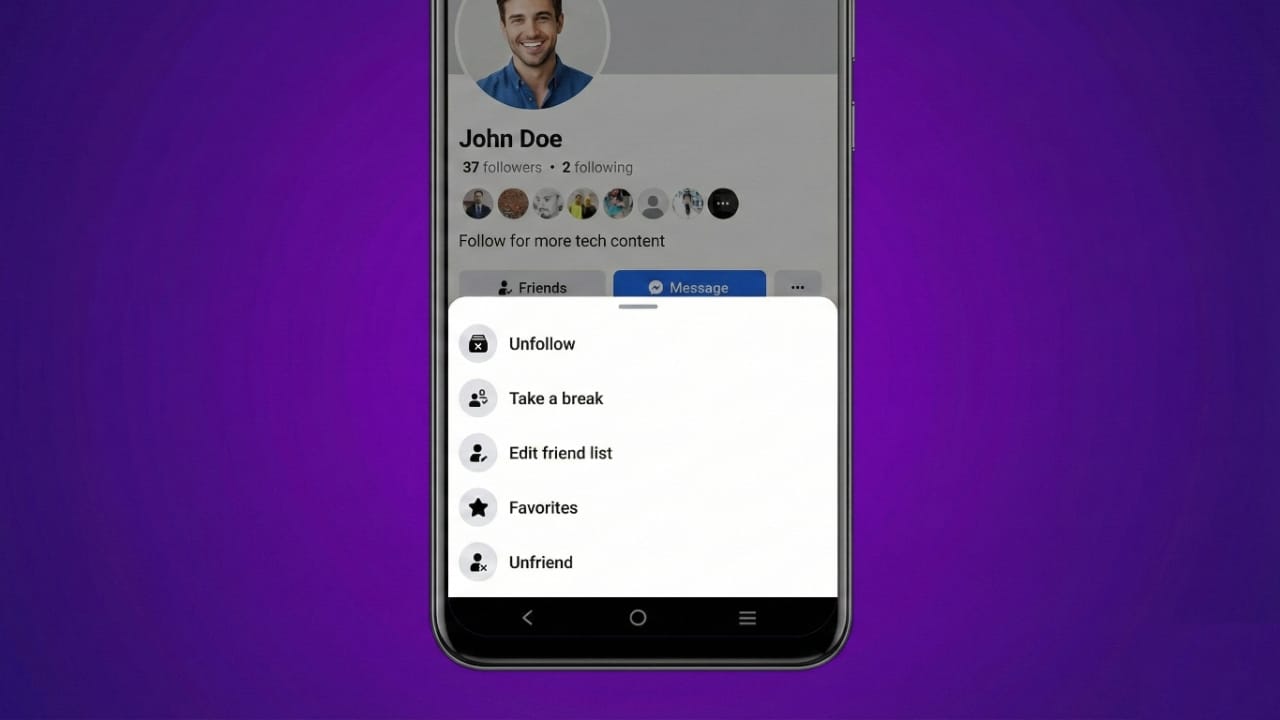
Facebook gives you full control over who stays on your friends list. If you want more privacy or a cleaner feed, removing someone can help. In this guide, you’ll learn how to unfriend a person on Facebook using both the mobile app and a computer. You’ll also understand what happens after unfriending and explore other useful options like Block, Unfollow, and Take a Break.
All steps are explained clearly and are suitable for users in India.
Also read: How to Hide Likes and Reactions on Facebook (Updated 2025)
How to Unfriend Someone on Facebook
You can remove a friend using either the Facebook app or the website. Both methods are quick and simple.
Unfriend Using the Facebook App (Android or iPhone)
- Open the Facebook app on your phone.
- Log in to your account if required.
- Use the search bar to find the person’s name.
- Open their profile.
- Tap the Friends button below their name.
- Select Unfriend from the list.
- Confirm your choice.
That’s it. The person is no longer on your friends list.
Unfriend Using Facebook on a Computer
- Open a browser and visit Facebook’s website.
- Sign in with your email and password.
- Search for the friend’s profile.
- Open their profile page.
- Click the Friends button near their cover photo.
- Choose Unfriend from the menu.
- Confirm the action.
The person will be removed immediately.
What Changes After You Unfriend Someone
Removing a friend affects how you and that person see each other on Facebook.
- Their posts will no longer appear in your feed.
- Your private posts will be hidden from them.
- Public posts and shared tags may still be visible.
- Facebook does not send any alert about unfriending.
- The person may only notice if they visit your profile.
Unfriending is a private action.
Can You Add Them Back Later?
Yes. You can send a new friend request anytime. If the other person accepts it, you’ll be friends again.
How to Check If Someone Removed You
There is no direct alert, but you can check manually.
- Visit their profile.
- If you see Add Friend, you’re no longer friends.
- If you can’t find their profile, they may have blocked you or deactivated their account.
Other Facebook Privacy Options You Should Know
Unfriending is not the only way to manage people on Facebook. You also have other useful controls.
What Happens When You Block Someone?
Blocking is a stronger action.
- They cannot see your profile or posts.
- They can’t message or tag you.
- They won’t be able to send you friend requests.
- Blocking also removes them from your friends list.
Steps to Block a Person
- Open their profile.
- Tap the three dots (more options).
- Select Block.
- Read the warning message.
- Confirm to block.
Once blocked, the person cannot interact with you on Facebook.
What Does Unfollow Mean on Facebook?
Unfollow lets you stay friends but stop seeing someone’s posts.
- Their updates won’t appear in your feed.
- They can still see your posts.
- They won’t be notified.
How to Unfollow Someone
- Open the person’s profile.
- Tap Friends or Following.
- Select Unfollow.
This is useful if you want peace without removing the friend.
What Is the “Take a Break” Feature?
This option is mainly available on the Facebook mobile app.
It allows you to:
- Hide their posts from your feed.
- Limit what they can see from you.
- Control visibility of past interactions.
Steps to Use Take a Break
- Go to the person’s profile.
- Tap the Friends button.
- Choose Take a Break.
- Adjust the settings as you like.
This feature is helpful during temporary or sensitive situations.
Also read: How to Link WhatsApp with Your Facebook Page for Better Business Results
FAQs About Unfriend on Facebook
Can they see my posts after I unfriend them?
Yes, but only posts set to Public.
Does Facebook notify them when I unfriend?
No. Facebook does not send any notification.
Can I become friends again later?
Yes. Just send a new friend request.
Which is better: Block or Unfriend?
Block is better if you want complete privacy.
Can I hide posts without removing the friend?
Yes. Use the Unfollow option.
Final Thoughts
Unfriending on Facebook is a simple way to protect your privacy and keep your feed comfortable. You can do it easily using the app or a computer. Facebook also offers options like Unfollow, Block, and Take a Break so you can choose what suits your situation best.
Use these tools wisely and stay connected only with people who matter to you.

Jatin Rajput (Tech Golu) — Tech blogger & YouTuber with 6+ years of experience in WhatsApp, Instagram, Facebook, and mobile guides. Founder of TechGolu.in.